Android 4.4 KitKat and Updated Developer Tools

Posted by Dave Burke, Engineering Director, Android Platform


Today we are announcing Android 4.4 KitKat, a new version of Android that brings great new features for users and developers.


The very first device to run Android 4.4 is the new Nexus 5, available today on Google Play, and coming soon to other retail outlets. We’ll also be rolling out the Android 4.4 update worldwide in the next few weeks to all Nexus 4, Nexus 7, and Nexus 10 devices, as well as the Samsung Galaxy S4 and HTC One Google Play Edition devices.


As part of this release, we kicked off Project Svelte, an effort to reduce the memory needs of Android so that it can run on a much broader range of devices, including entry-level devices that have as little as 512MB RAM. From the kernel to system, frameworks, and apps, we've reduced memory footprint and improved memory management so Android can run comfortably on only 512MB of RAM. We did this not only on Android but across Google apps, like Chrome and YouTube.


By supporting a broader range of devices, Android 4.4 will help move the Android ecosystem forward. Now all users will be able to enjoy the very best that Android has to offer, on the devices that best meet their needs.


Here’s a quick look at some of the new features for developers:


  • New ways to create beautiful apps — A new full-screen immersive mode lets your app or game use every pixel on the screen to showcase content and capture touch events. A new transitions framework makes it easier to animate the states in your UI. Web content can take advantage of a completely new implementation of WebView built on Chromium.


  • More useful than ever — A printing framework lets you add the convenience of printing to your apps. A storage access framework makes it easier for users find documents, photos, and other data across their local and cloud-based storage services. You can integrate your app or storage service with the framework to give users instant access to their data.


  • Low-power sensors — New hardware-integrated sensors let you add great new features to your apps without draining the battery. Included are a step detector and step counter that let you efficiently track of the number of walking steps, even when the screen is off.


  • New media capabilities — A new screen recorder lets you capture high-quality video of your app directly from your Android device. It's a great new way to create walkthroughs, tutorials, marketing videos, and more. Apps can use adaptive playback to offer a significantly better streaming video experience.


  • RenderScript in the NDK — A new C++ API in the Android Native Development Kit (NDK) lets you use RenderScript from your native code, with access to script intrinsics, custom kernels, and more.


  • Improved accessibility support — New system-wide captioning settings let your apps present closed captions in the style that's preferred by the user.


There's a lot more, so be sure to check out the Android 4.4 platform highlights for a complete overview of those and other new capabilities for developers. For details on the APIs and how to use them, take a look at the API Overview or watch one of the new DevBytes videos on KitKat.


Along with the new Android 4.4 platform we're releasing a new version of the Android NDK (r9b). The new NDK gives you native access to RenderScript and other stable APIs in Android 4.4, so if you've been waiting to use RenderScript from your native code, give it a try.


Last, we've updated the Support Package (r19) with a new helper library for printing images through the new printing framework, as well as other updates.


You can get started developing and testing on Android 4.4 right away, in Android Studio or in ADT/Ant. You can download the Android 4.4 Platform (API level 19), as well as the SDK Tools, Platform Tools, and Support Package from the Android SDK Manager.


Google Play Services 4.0

Today we're launching a new release of Google Play services. Version 4.0 includes the Google Mobile Ads SDK, and offers improvements to geofencing, Google+, and Google Wallet Instant Buy APIs.


With over 97% of devices now running Android 2.3 (Gingerbread) or newer platform versions, we’re dropping support for Froyo from this release of the Google Play services SDK in order to make it possible to offer more powerful APIs in the future. That means you will not be able to utilize these new APIs on devices running Android 2.2 (Froyo).


We’re still in the process of rolling out to Android devices across the world, but you can already download the latest Google Play services SDK and start developing against the new APIs using the new Android 4.4 (KitKat) emulator.


Google Mobile Ads


If you’re using AdMob to monetize your apps, the new Google Mobile Ads SDK in Google Play services helps provide seamless improvements to your users. For example, bug fixes get pushed automatically to users without you having to do anything. Check out the post on the Google Ads Developer Blog for more details.


Maps and Location Based Services


The Maps and Geofencing APIs that launched in Google Play services 3.1 have been updated to improve overall battery efficiency and responsiveness.


You can save power by requesting larger latency values for notifications alerting your app to users entering or exiting geofences, or request that entry alerts are sent only after a user stays within a geofence for a specified period of time. Setting generous dwell times helps to eliminate unwanted notifications when a user passes near a geofence or their location is seen to move across a boundary.


The Maps API enhances map customization features, letting you specify marker opacity, fade-in effects, and visibility of 3D buildings. It’s also now possible to change ground overlay images.


Google+ and Google Wallet Instant Buy


Apps that are enabled with Google+ Sign-In will be updated with a simplified sign-in consent dialog. Google Wallet Instant Buy APIs are now available to everyone to try out within a sandbox, with a simplified API that streamlines the buy-flow and reduces integration time.


Google Wallet Instant Buy also includes new Wallet Objects, which means you can award loyalty points to a user's saved rewards program ID for each applicable Google Wallet Instant Buy purchase.


New user control over advertising identifier


To give users better controls and to provide you with a simple, standard system to continue to monetize your apps, this update contains a new, anonymous identifier for advertising purposes (to be used in place of Android ID). Google Settings now includes user controls that enable users to reset this identifier, or opt out of interest-based ads for Google Play apps.


More About Google Play Services


To learn more about Google Play services and the APIs available to you through it, visit the Google Services area of the Android Developers site.


Making your App Content more Accessible from Google

Posted by Chaesang Jung, Software Engineer


There are many reasons to build or not to build a mobile app as part of your broader mobile strategy. For instance, while apps offer a rich user experience, users can’t access them through Google Search like they do websites. Today, we’re announcing a new Google Search capability, app indexing, that will start to make apps more accessible through Google on Android.


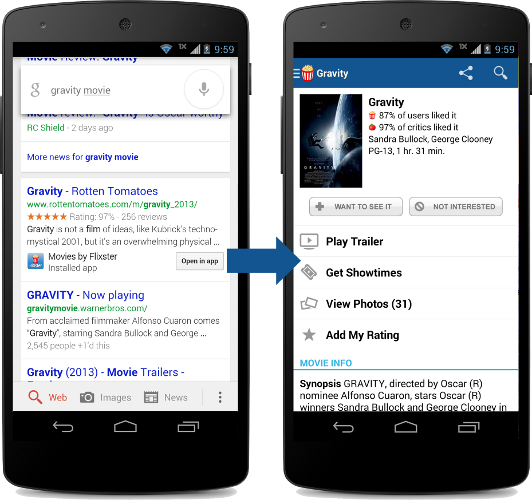
Let’s say that a user is searching for a movie. With app indexing, Google will begin to include deep links to apps in Android search results. When the user taps on the “Open in app” deep links, the app opens up directly to the movie in question.


In this example, in order for the app deep links to appear in search results,


  • The Flixster app supports deep linking

  • The Rotten Tomatoes website has specified that the Flixster app page is an alternate for the web page

  • Google has indexed the Flixster app to determine relevance

  • The user has installed the Flixster app


The end result is that users will have a seamless search experience when accessing your app content through Google.


Google is currently testing app indexing with an initial group of developers including AllTheCooks, AllTrails, Beautylish, Etsy, Expedia, Flixster, Healthtap, IMDb, moviefone, newegg, OpenTable, Trulia, and Wikipedia. Deep links for these applications will start to appear in Google search results on Android, in the US, in a few weeks.


How to get started


If you are interested in enabling indexing for your Android app, you can learn more about our developer guidelines at developers.google.com/app-indexing and sign up. We are expanding our app indexing efforts and will gradually include more developers over time.


Getting Your SMS Apps Ready for KitKat


Posted by Scott Main and David Braun


Sending and receiving SMS messages are fundamental features on mobile devices and many developers have built successful apps that enhance this experience on Android. Some of you have built SMS apps using hidden APIs—a practice we discourage because hidden APIs may be changed or removed and new devices are not tested against them for compatibility. So, to provide you with a fully supported set of APIs for building SMS apps and to make the user experience for messaging more predictable, Android 4.4 (KitKat) makes the existing APIs public and adds the concept of a default SMS app, which the user can select in system settings.


This means that if you are using the hidden SMS APIs on previous platform versions,
you need to make some adjustments so your app continues to work when Android 4.4 is released later this year.


Make your app the default SMS app


On Android 4.4, only one app can receive the new SMS_DELIVER_ACTION intent, which the system
broadcasts when a new SMS message arrives. Which app receives this broadcast is determined by
which app the user has selected as the default SMS app in system settings. Likewise, only the
default SMS app receives the new WAP_PUSH_DELIVER_ACTION intent when a new MMS arrives.


Other apps that only want to read new messages can instead receive the SMS_RECEIVED_ACTION broadcast intent when a new SMS arrives. However, only the app that receives the SMS_DELIVER_ACTION broadcast (the user-specified default SMS app) is able to write to the SMS Provider defined by the android.provider.Telephony class and subclasses. As such, it's important that you update your messaging app as soon as possible to be available as a default SMS app, because although your existing app won't crash on an Android 4.4 device, it will silently fail when attempting to write to the SMS Provider.


In order for your app to appear in the system settings as an eligible default SMS app, your manifest file must declare some specific capabilities. So you must update your app to do the following things:


  • In a broadcast receiver, include an intent filter for SMS_DELIVER_ACTION ("android.provider.Telephony.SMS_DELIVER"). The broadcast receiver must also require the BROADCAST_SMS permission.

    This allows your app to directly receive incoming SMS messages.


  • In a broadcast receiver, include an intent filter for WAP_PUSH_DELIVER_ACTION ("android.provider.Telephony.WAP_PUSH_DELIVER") with the MIME type "application/vnd.wap.mms-message". The broadcast receiver must also require the BROADCAST_WAP_PUSH permission.

    This allows your app to directly receive incoming MMS messages.


  • In your activity that delivers new messages, include an intent filter for ACTION_SENDTO ("android.intent.action.SENDTO") with schemas, sms:, smsto:, mms:, and mmsto:.

    This allows your app to receive intents from other apps that want to deliver a message.


  • In a service, include an intent filter for ACTION_RESPONSE_VIA_MESSAGE ("android.intent.action.RESPOND_VIA_MESSAGE") with schemas, sms:, smsto:, mms:, and mmsto:. This service must also require the SEND_RESPOND_VIA_MESSAGE permission.

    This allows users to respond to incoming phone calls with an immediate text message using your app.


For example, here's a manifest file with the necessary components and intent filters:


<manifest>
...
<application>
<!-- BroadcastReceiver that listens for incoming SMS messages -->
<receiver android:name=".SmsReceiver"
android:permission="android.permission.BROADCAST_SMS">
<intent-filter>
<action android:name="android.provider.Telephony.SMS_DELIVER" />
</intent-filter>
</receiver>

<!-- BroadcastReceiver that listens for incoming MMS messages -->
<receiver android:name=".MmsReceiver"
android:permission="android.permission.BROADCAST_WAP_PUSH">
<intent-filter>
<action android:name="android.provider.Telephony.WAP_PUSH_DELIVER" />
<data android:mimeType="application/vnd.wap.mms-message" />
</intent-filter>
</receiver>

<!-- Activity that allows the user to send new SMS/MMS messages -->
<activity android:name=".ComposeSmsActivity" >
<intent-filter>
<action android:name="android.intent.action.SEND" />
<action android:name="android.intent.action.SENDTO" />
<category android:name="android.intent.category.DEFAULT" />
<category android:name="android.intent.category.BROWSABLE" />
<data android:scheme="sms" />
<data android:scheme="smsto" />
<data android:scheme="mms" />
<data android:scheme="mmsto" />
</intent-filter>
</activity>

<!-- Service that delivers messages from the phone "quick response" -->
<service android:name=".HeadlessSmsSendService"
android:permission="android.permission.SEND_RESPOND_VIA_MESSAGE"
android:exported="true" >
<intent-filter>
<action android:name="android.intent.action.RESPOND_VIA_MESSAGE" />
<category android:name="android.intent.category.DEFAULT" />
<data android:scheme="sms" />
<data android:scheme="smsto" />
<data android:scheme="mms" />
<data android:scheme="mmsto" />
</intent-filter>
</service>
</application>
</manifest>


Any filters for the SMS_RECEIVED_ACTION broadcast in existing apps will continue to work the same on Android 4.4, but only as an observer of new messages, because unless your app also receives the SMS_DELIVER_ACTION broadcast, you cannot write to the SMS Provider on Android 4.4.


Beginning with Android 4.4, you should stop listening for the SMS_RECEIVED_ACTION broadcast, which you can do at runtime by checking the platform version then disabling your broadcast receiver for SMS_RECEIVED_ACTION with PackageManager.setComponentEnabledSetting(). However, you can continue listening for that broadcast if your app needs only to read special SMS messages, such as to perform phone number verification. Note that—beginning with Android 4.4—any attempt by your app to abort the SMS_RECEIVED_ACTION broadcast will be ignored so all apps interested have the chance to receive it.


Tip: To distinguish the two SMS broadcasts, imagine that the SMS_RECEIVED_ACTION simply says "the system received an SMS," whereas the SMS_DELIVER_ACTION says "the system is delivering your app an SMS, because you're the default SMS app."


Disable features when not the default SMS app


In consideration of some apps that do not want to behave as the default SMS app but still want to send messages, any app that has the SEND_SMS permission is still able to send SMS messages using SmsManager. If and only if an app is not selected as the default SMS app on Android 4.4, the system automatically writes the sent SMS messages to the SMS Provider (the default SMS app is always responsible for writing its sent messages to the SMS Provider).


However, if your app is designed to behave as the default SMS app, then while your app is not selected as the default, it's important that you understand the limitations placed upon your app and disable features as appropriate. Although the system writes sent SMS messages to the SMS Provider while your app is not the default SMS app, it does not write sent MMS messages and your app is not able to write to the SMS Provider for other operations, such as to mark messages as draft, mark them as read, delete them, etc.


So when your messaging activity resumes, check whether your app is the default SMS app by querying Telephony.Sms.getDefaultSmsPackage(), which returns the package name of the current default SMS app. If it doesn't match your package name, disable features such as the ability for users to send new messages.


When the user decides to use your app for messaging, you can display a dialog hosted by the system that allows the user to make your app the default SMS app. To display the dialog, call startActivity() with the Telephony.Sms.Intents.ACTION_CHANGE_DEFAULT intent, including an extra with the Sms.Intents.EXTRA_PACKAGE_NAME key and your package name as the string value.


For example, your activity might include code like this:


public class ComposeSmsActivity extends Activity {

@Override
protected void onResume() {
super.onResume();

final String myPackageName = getPackageName();
if (!Telephony.Sms.getDefaultSmsPackage(this).equals(myPackageName)) {
// App is not default.
// Show the "not currently set as the default SMS app" interface
View viewGroup = findViewById(R.id.not_default_app);
viewGroup.setVisibility(View.VISIBLE);

// Set up a button that allows the user to change the default SMS app
Button button = (Button) findViewById(R.id.change_default_app);
button.setOnClickListener(new View.OnClickListener() {
public void onClick(View v) {
Intent intent =
new Intent(Telephony.Sms.Intents.ACTION_CHANGE_DEFAULT);
intent.putExtra(Telephony.Sms.Intents.EXTRA_PACKAGE_NAME,
myPackageName);
startActivity(intent);
}
});
} else {
// App is the default.
// Hide the "not currently set as the default SMS app" interface
View viewGroup = findViewById(R.id.not_default_app);
viewGroup.setVisibility(View.GONE);
}
}
}


Advice for SMS backup & restore apps


Because the ability to write to the SMS Provider is restricted to the app the user selects as the default SMS app, any existing app designed purely to backup and restore SMS messages will currently be unable to restore SMS messages on Android 4.4. An app that backs up and restores SMS messages must also be set as the default SMS app so that it can write messages in the SMS Provider. However, if the app does not also send and receive SMS messages, then it should not remain set as the default SMS app. So, you can provide a functional user experience with the following design when the user opens your app to initiate a one-time restore operation:


  1. Query the current default SMS app's package name and save it.
    String defaultSmsApp = Telephony.Sms.getDefaultSmsPackage(context);


  2. Request the user change the default SMS app to your app in order to restore SMS messages (you must be the default SMS app in order to write to the SMS Provider).
    Intent intent = new Intent(context, Sms.Intents.ACTION_CHANGE_DEFAULT);
    intent.putExtra(Sms.Intents.EXTRA_PACKAGE_NAME, context.getPackageName());
    startActivity(intent);


  3. When you finish restoring all SMS messages, request the user to change the default SMS app back to the previously selected app (saved during step 1).
    Intent intent = new Intent(context, Sms.Intents.ACTION_CHANGE_DEFAULT);
    intent.putExtra(Sms.Intents.EXTRA_PACKAGE_NAME, defaultSmsApp);
    startActivity(intent);


Prepare to update your SMS app


We encourage you to update your apps as soon as possible to provide your users the best experience on Android. To help you make the changes, we'll soon be providing the necessary SDK components for Android 4.4 that allow you to compile and test your changes on Android 4.4. Stay tuned!



Tablet changes in Google Play coming up November 21

Posted by Ellie Powers, Google Play team


Fueled by the Nexus 7 and other great devices, more than 70 million Android tablets have been activated. Thousands of developers have already designed their apps to look great on tablets, and with the holidays fast approaching, we’re making it even easier for the next wave of tablet owners to discover great apps and games.


Play Store tablet changes coming up on November 21


Earlier this year, Google Play added a “designed for tablets” section, where users could easily discover apps that look great on their 7”- and 10”-tablets. This section includes only apps and games which meet criteria and guidelines we established last year. (Here’s an overview if you missed it.) Developers who invest the time to meet the criteria are seeing great results; take Remember The Milk, which saw an 83% increase in tablet downloads from being in this section. (see the whole story here).


On November 21, the Play Store will make a series of changes so it’s even easier for tablet users to find those apps that are best for their devices. First, by default, users browsing Google Play on a tablet will now see apps and games that are designed for tablets on the top lists (Top Paid, Top Free, Top Grossing, Top New Paid, Top New Free, and Trending). Tablet users will still be able to switch the view so they can see all apps or games if they choose. Also starting November 21, apps and games that do not meet the “designed for tablets” criteria will be marked as “designed for phones” for users who browse the Play Store on tablets.


You’ll want to make sure that your app is designed for tablets; read more about how to do this at the end of this blog post.


Make sure your app is ready!


If you want to be sure your app is included in the “Designed for tablets” view in time for the November 21 Play Store changes, go to the Developer Console to check your tablet optimization tips. If you see any issues listed there, you’ll need to address them in your app and upload a new binary for distribution. If there are no issues listed, your app is eligible to be included in the “Designed for tablets" view in the top lists.


Also, make sure to read the full tablet quality checklist to understand how to build outstanding tablet experiences.


Everyday, thousands of Android developers are taking advantage of the tremendous Android tablet opportunity. The flood of new users coupled with the increased screen size means new user experiences, more engagement and more monetization opportunities. We’re excited to see what you do!


Undoing the pretzel logic of finance

My latest column in Bloomberg came out a few days ago. The article looks at some recent work of young MIT economist Alp Simsek that considers how new derivative instruments influence market stability. He comes to a conclusion that most ordinary people would find utterly unsurprising:
Financial markets in recent years have seen a proliferation of new …financial assets such as different types of futures, swaps, options, and more exotic derivatives. According to the traditional view of …nancial innovation, these assets facilitate the diversi…cation and the sharing of risks. However, this view does not take into account that market participants might naturally disagree about how to value …financial assets. The thesis of this paper is that belief disagreements change the implications of …nancial innovation for portfolio risks. In particular, market participants’' disagreements naturally lead to speculation, which represents a powerful economic force by which fi…nancial innovation increases portfolio risks.
There you go. Because not all people have the same views on the future, derivatives can be used to speculate and gamble. This increases risks in the market. More derivatives and more complete markets is not always a good thing, as standard financial theory would have it.

To be clear, I'm not poking fun at Simsek's work. Not at all. I think this work should be spread far and wide. That this idea comes as news to the academic finance community shows how deeply confused they have become by the received wisdom of market completeness as an ideal. They (at least many) do believe that UP = DOWN, and so news to the contrary sounds radical. In the article I've mentioned several other earlier studies (I've written about them here before, just search on "derivatives") that point to the same conclusion: more derivatives in general leads to more market instability (again, as most people already believe).

It's nice to see some influential young economists picking up and exploring this idea.

The real trouble with economics

I pretty much agree with everything Mark Thoma says here in pointing to sociological factors within academic economics as the source of recent problems. Anyone who has read this blog knows I'm not so sanguine about the supposed "sophistication" of the analytical models currently used in macroeconomics, but, that to one side, Thoma is right that the real problem has been a lack of imagination and willingness to build models (probably messy and inelegant ones) that would inform us in a practically useful way about possible market instabilities:

 "I talked about the problem with the sociology of economics awhile back -- this is from a post in August, 2009:

In The Economist, Robert Lucas responds to recent criticism of macroeconomics ("In Defense of the Dismal Science"). Here's my entry at Free Exchange's Robert Lucas Roundtable in response to his essay:
Lucas roundtable: Ask the right questions, by Mark Thoma: In his essay, Robert Lucas defends macroeconomics against the charge that it is "valueless, even harmful", and that the tools economists use are "spectacularly useless".
I agree that the analytical tools economists use are not the problem. We cannot fully understand how the economy works without employing models of some sort, and we cannot build coherent models without using analytic tools such as mathematics. Some of these tools are very complex, but there is nothing wrong with sophistication so long as sophistication itself does not become the main goal, and sophistication is not used as a barrier to entry into the theorist's club rather than an analytical device to understand the world.
But all the tools in the world are useless if we lack the imagination needed to build the right models. Models are built to answer specific questions. When a theorist builds a model, it is an attempt to highlight the features of the world the theorist believes are the most important for the question at hand. For example, a map is a model of the real world, and sometimes I want a road map to help me find my way to my destination, but other times I might need a map showing crop production, or a map showing underground pipes and electrical lines. It all depends on the question I want to answer. If we try to make one map that answers every possible question we could ever ask of maps, it would be so cluttered with detail it would be useless, so we necessarily abstract from real world detail in order to highlight the essential elements needed to answer the question we have posed. The same is true for macroeconomic models.
But we have to ask the right questions before we can build the right models.
The problem wasn't the tools that macroeconomists use, it was the questions that we asked. The major debates in macroeconomics had nothing to do with the possibility of bubbles causing a financial system meltdown. That's not to say that there weren't models here and there that touched upon these questions, but the main focus of macroeconomic research was elsewhere. ...
The interesting question to me, then, is why we failed to ask the right questions. For example,... why policymakers didn't take the possibility of a major meltdown seriously. Why didn't they deliver forecasts conditional on a crisis occurring? Why didn't they ask this question of the model? Why did we only get forecasts conditional on no crisis? And also, why was the main factor that allowed the crisis to spread, the interconnectedness of financial markets, missed?
It was because policymakers couldn't and didn't take seriously the possibility that a crisis and meltdown could occur. And even if they had seriously considered the possibility of a meltdown, the models most people were using were not built to be informative on this question. It simply wasn't a question that was taken seriously by the mainstream.
Why did we, for the most part, fail to ask the right questions? Was it lack of imagination, was it the sociology within the profession, the concentration of power over what research gets highlighted, the inadequacy of the tools we brought to the problem, the fact that nobody will ever be able to predict these types of events, or something else?
It wasn't the tools, and it wasn't lack of imagination. As Brad DeLong points out, the voices were there—he points to Michael Mussa for one—but those voices were not heard. Nobody listened even though some people did see it coming. So I am more inclined to cite the sociology within the profession or the concentration of power as the main factors that caused us to dismiss these voices.
And here I think that thought leaders such as Robert Lucas and others who openly ridiculed models they disagreed with have questions they should ask themselves (e.g. Mr Lucas saying "At research seminars, people don’t take Keynesian theorizing seriously anymore; the audience starts to whisper and giggle to one another", or more recently "These are kind of schlock economics"). When someone as notable and respected as Robert Lucas makes fun of an entire line of inquiry, it influences whole generations of economists away from asking certain types of questions, some of which turned out to be important. Why was it necessary for the major leaders in macroeconomics to shut down alternative lines of inquiry through ridicule and other means rather than simply citing evidence in support of their positions? What were they afraid of? The goal is to find the truth, not win fame and fortune by dominating the debate.
We need to take a close look at how the sociology of our profession led to an outcome where people were made to feel embarrassed for even asking certain types of questions. People will always be passionate in defense of their life's work, so it's not the rhetoric itself that is of concern, the problem comes when factors such as ideology or control of journals and other outlets for the dissemination of research stand in the way of promising alternative lines of inquiry.
I don't know for sure the extent to which the ability of a small number of people in the field to control the academic discourse led to a concentration of power that stood in the way of alternative lines of investigation, or the extent to which the ideology that markets prices always tend to move toward their long-run equilibrium values caused us to ignore voices that foresaw the developing bubble and coming crisis. But something caused most of us to ask the wrong questions, and to dismiss the people who got it right, and I think one of our first orders of business is to understand how and why that happened.
I think the structure of journals, which concentrates power within the profession, also influence the sociology of the profession (and not in a good way)."